On-site User Guide of the Tokyo Main Library
Table of Contents
- 1. Before Your Visit
- 2. Visiting the Library
- 3. Searching for Materials
- 4. Requesting Copies
- 5. Returning Materials
- 6. Leaving the Library
1. Before Your Visit
Most of the holdings of the NDL are in closed stacks where users cannot enter.
User registration (official registration) is required to request library materials from the closed stacks.
Online registration is also available.
1-1. Check Our Collections First
Please check NDL Search to see if we have the materials you need before visiting.
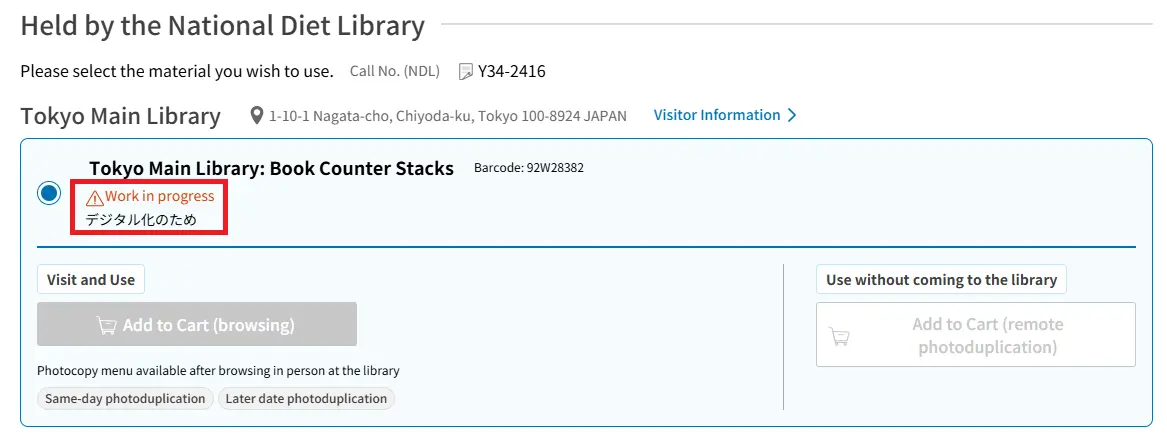
Note: Materials showing "In use," "Working," or "Work in progress" in the collection information are unavailable.
For further details, please refer to ‘5-11 Collection of the National Diet Library’
in NDL Search Help.
Digitized materials are available on the National Diet Library Digital Collections.
Note: The original materials are not available for viewing.
Your local library may also have the item, so please check their catalog.
1-2. Services Available Without Visiting the Library
As an NDL official registered user residing in Japan, you can access more digitized materials from home via our individual transmission service.
- The National Diet Library Digital Collections
- Digitized Contents Transmission Service for Individuals
- Remote Photoduplication Service
- Reference Service
- Research Navi
2. Visiting the Library
2-1. Entering the Library
There are two entrances for visitors, the Main Building Entrance and the Annex Entrance.
If this is your first visit, please enter using the Annex Entrance.
Issuing a User Card
Please complete the procedure at the User Registration Counter in the Annex if any of the following apply to you.
Note: Identification documents are required for items 1 through 4.
- Those who applied via NDL Search or by postal mail and have not been issued a registered user card
- Those registering for the first time
- Those whose user registration has expired (valid for 3 years)
- Those who hold a previous user card with a printed barcode
- Those who wish to use the library for one day only without user registration (Materials in the stacks are not available.)
Storing Your Belongings in Lockers
Opaque bags larger than B5 size are not allowed inside the library.
Please store them in the lockers.
To carry your personal items inside, you can use our transparent bags provided in the locker room. These bags are for library use only.
Passing through the Gate
Please tap your user card on the reader to enter.
Tokyo Main Building Visitor Guide Video: "How to Enter" (In Japanese)(YouTube)
2-2. Research Help
Staff at the General Information Desks in both the Main Building and the Annex will help you with how to use the library.
Each Special Materials Room also provides research help (reference services) for your specific topic.
If you are not sure which room to visit, please ask at the General Information Desk.
3. Searching for Materials
Please use the library terminals or your own device to search for materials.
Log in to NDL Search to find the items you need.
Request procedures depend on the location of the materials.
- 3-1. Using Materials from the Stacks
- 3-2. Using the NDL Digital Collections
- 3-3. Using Open-Shelf Materials in Special Materials Rooms
Note: Electronic journals and databases are also available on the library terminals.
Tokyo Main Building Visitor Guide Video "How to Search and Request Materials" (In Japanese)(YouTube)
3-1. Using Materials from the Stacks
Requesting and Receiving Materials
Please use a library terminal or your own device to request materials.
For detailed instructions, please refer to “A Guide to Library Terminals” available in the library.
- Submit your request via NDL Search.
- After 20–30 minutes, check the Request Status section in NDL Search to see if the materials have arrived.
- Once you confirm that the status is “Arrived,” pick up the materials at the designated counter.
Reading materials
Please read materials in the reading rooms or at the seating areas in the Main Building and the Annex.
Materials in the Special Materials Rooms must be used within those rooms.
Library materials cannot be taken outside the building.
Tokyo Main Building Visitor Guide Video: "How to Browse Materials" (In Japanese) (YouTube)
3-2.Using the NDL Digital Collections
You can access digitized materials from our collection, as well as online materials (e-books, e-journals, etc.) that we have collected and preserved, via the National Diet Library Digital Collection.
For detailed instructions, please refer to “A Guide to Library Terminals” available in the library.
Note: The original materials are not available for viewing.
Please watch the video below on how to search the National Diet Library Digital Collection.
Tokyo Main Building Visitor Guide Video: "How to Browse Digitized Materials" (In Japanese)(YouTube)
3-3. Using Open-Shelf Materials in Special Materials Rooms
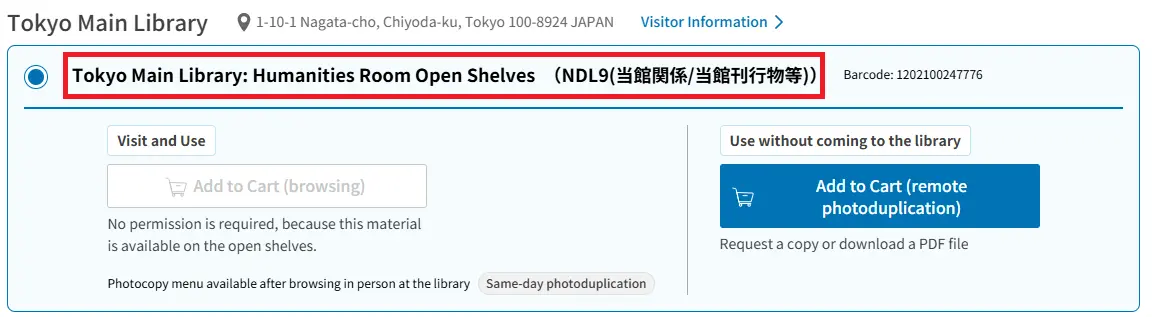
Materials shown as "Open Shelves" in NDL Search do not require a request.
Please use them in the designated Special Materials Room.
4. Requesting Copies
Materials can be copied within the limits of Japanese copyright law.
All copying is done by staff (no self-service).
Fees apply and vary by paper size and color.
4-1. Photocopying Paper Materials
You can request copies after you receive the materials.
Please print the photoduplication request form via NDL Search, fill it out, and submit it at the Copying Center.
Fees apply.
For detailed instructions, please refer to “A Guide to Library Terminals” available in the library.
Tokyo Main Building Visitor Guide Video: "How to Copy Materials" (In Japanese) (YouTube)
4-2. Printing Digitized Materials
With a few exceptions, digitized materials and electronic journals can be printed (fees apply).
Please send a print request from the library terminal and complete the process at the Printout Counter before the closing time on the same day.
For detailed instructions, please refer to “A Guide to Library Terminals” available in the library.
Tokyo Main Building Visitor Guide Video: "How to Print Out Digitized Materials" (In Japanese) (YouTube)
5. Returning Materials
Please return all materials to the designated counter after use.
6. Leaving the Library
Please tap your user card on the reader and pass through the gate to exit.
Note: You cannot leave the library if you have unreturned materials or unpaid photocopy fees.